
One of the many new features you get for free with Yosemite is the ability to make and answer phone calls from your Mac. This assumes, of course, you’ve got an iPhone running iOS 8. I believe the connectivity between your phone and your Mac is established when FaceTime on both devices is tied to the same Apple ID.
To check this on your Mac, launch FaceTime and check Preferences from the FaceTime menu. On your phone, check Settings > FaceTime. Chances are good that this will just work out of the box, but good to know where to go if things are not already wired together.
Once your phone and Mac FaceTimes are on the same Apple ID, you are good to go. When your phone rings, OS X will launch FaceTime and a small window will appear, notifying you of an incoming call. You can answer the call, decline the call, or choose from a list of options including the ability to send an SMS to the caller.
If you miss the call, the incoming call window will stay up. Click on it and you’ll return the call.
If you answer the call, you’ll see a window like this one:
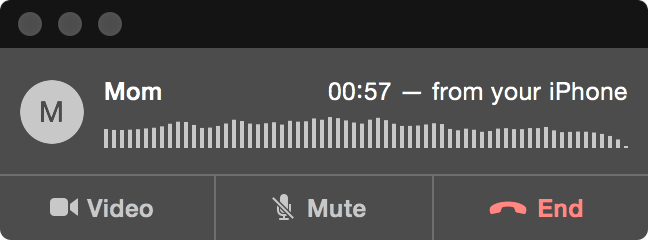
The wave of lines in the middle of the window react to your voice and do a good job giving you a sense of the relative call volume.
To learn more about making phone calls and Yosemite/iOS 8 continuity, check out Apple’s official continuity page.
Is the texting via Messages across devices enabled fully now, or is that waiting for iOS 8.1? I know I need Yosemite on my Mac to get calls and messages, However, I have calls working from my phone to my iPad Mini, but Messages isn’t linking up completely. I see the blue texts from other iPhone users (not sure if they are coming through or if I just see the archived messages), but no green texts from Android/etc., both archived or arriving.
Looking forward to all the Continuity stuff and the ApplePay. 🙂
8.1, on Monday.
Dang, looks like my 2009 MacBook Pro won’t be getting a lot of the Yosemite goodies, like handoff, instant hotspot, airdrop and airplay mirroring. Though apparently I will be able to make phone calls. (Heading to the reburb store…)
No android support? Non-starter!
KIDDING! This is a very big deal for Mac sales, IMHO. Integration breeds lockin., I think.
This doesn’t work if you’ve got the phone set to use wifi calling. You have to turn it off before you can use this feature.
Is that because of bluetooth LE?
should phone calling work with 8.0? mine just says “iPhone is not configured to allow calls using your mac”. Phone has handoff enabled. I don’t see any continuity settings anywhere.
I didn’t know I could use the iPhone with my WIFI iPad 3. I clicked on my fiancé’s phone number in Contacts and the iPad initiated a call with my iPhone 5s.
just an update: you have to enable FaceTime audio on the iPhone. I never knew to do that and since I didn’t use FaceTime on it it was never signed in.
It must be the same iCloud Apple ID. If you are using an Apple ID which is iTunes Store only it doesn’t work. Even if you have all the same on your devices.
I have an issue with calling on Yosemite. I can hear the other person, but they cannot hear me.
Have you tried your mic in other apps just to make sure your mic is working?