
In the previous (and first) column in this series, I laid out who I was and what I thought this column would be about. In my mind, I had a plan for what I would write about, step by step, column by column.
And then The Loop’s Publisher ruined all of that.
[ad#Google Adsense 300×250 in story](When I say “The Loop’s Publisher”, everyone knows I mean Jim Dalrymple. But they are two different entities to me. The Loop’s Publisher signs the checks so I listen to him. Jim, not so much.)
But The Loop’s Publisher asked a great question. “Is the iPhone a Good Point and Shoot Camera?”
I said it was a great question, but not an easy one to answer.
A guy named Chase Jarvis is building a career around a concept photographers have known for decades — the best camera is the one you have with you. There’s no doubt that a $10,000 DSLR will take better pictures than your iPhone or your little point and shoot camera, but will you have it with you when you need to take the shot?
I asked on Twitter, “What are the pros of the iPhone camera?” and “It’s always with me” was the number one asnwer. It’s easy to have your iPhone with you 24/7 so for most of us, it becomes the “best” camera by default.
 Take a look at the pictures on your iPhone now. Do you see a theme or a style? How about a situation? I tend to use my iPhone’s camera to take pictures I want to immediately share with family and friends, either via email or Twitter. For example, I have a picture of my cute little niece, Emily on my motorcycle. It’s not a great picture — low quality, blown out highlights, a little blurry — but it’s a picture of a moment I thought was very sweet. But we were in a garage and the only camera I had handy was on my iPhone. Rather than miss the moment, I used what can be argued is not a good camera in that situation and took the shot.
Here’s another example. Rather than dig around looking for my SLR or P&S, I quickly grabbed my iPhone and took a picture of this “Kitty Bookend”.
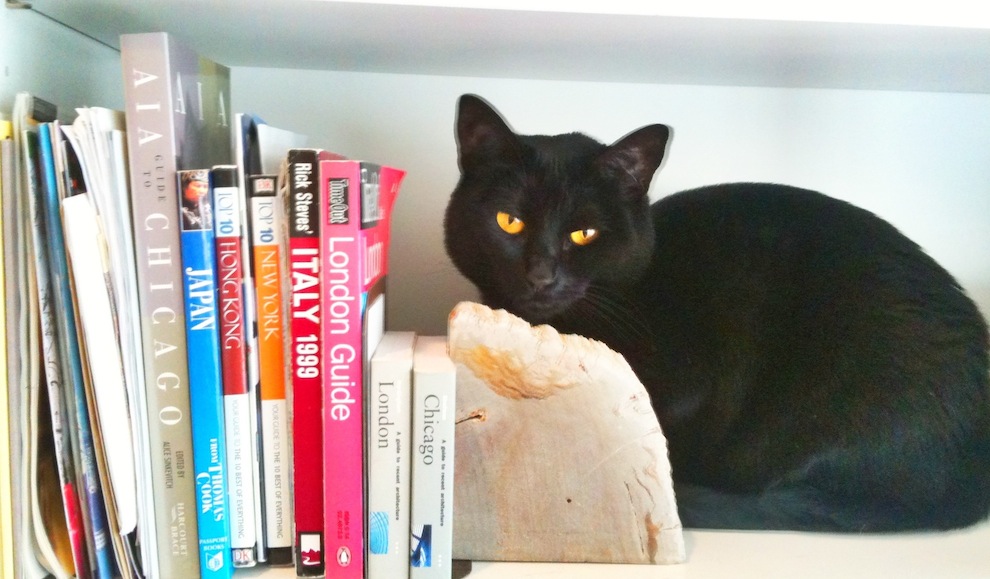 So, if the iPhone is the only camera you have on you, it automatically becomes the “best.” But would I recommend buying an iPhone over a Point and Shoot?
It’s rare that you would leave your house and intentionally leave your phone behind, the idea of carrying two “cameras” around makes people look at the iPhone as a real alternative to the traditional little P&S you slip in a purse or jacket pocket. And, in many ways, the iPhone is a good, fun, low-to-mid range P&S.
Let’s look at the advantages and disadvantages of the iPhone over a P&S.
 Interface is definitely one of them. In this case, fewer (buttons) is better. It’s very easy to take a picture with the iPhone’s camera. Click, swipe, tap — camera is ready. When you want to look at the photo, one more click takes you to the library. On some P&S’, you have to dig through an often confusing (and different for every manufacturer) menu system.
But while P&S aren’t “instant on”, they do turn on very quickly and are generally ready to shoot faster than an iPhone. That’s important if you want to grab a fleeting instant.
Apple has kindly included two lenses in the iPhone 4 — one rear facing and the other front facing. The latter is great for those difficult self portraits. (Keep in mind, the front facing camera is a lower quality one than the rear facing lens)
Most P&S cameras use little 2GB, 4GB even 8GB Flash Cards as photo storage. The iPhone starts out at 16GB — not all of it dedicated to photo storage but a good portion of it can be.
The iPhone is a 5 megapixel camera, which is perfectly acceptable for any photo you want to take that would stay on your phone to show it off or for emailing to family and friends or putting on Facebook. It’s on the low end if you want to print it out at a decent (8 1/2″ X 11″) size. And, right now, you can’t print directly to a printer from your iPhone, but you can on several models of P&S.
The iPhone camera is well below even the low end P&S in low light conditions. Even with the “fake flash” Apple has included in the iPhone 4, low light is not the iPhone’s forte. Remember, photography is all about capturing light. The bigger, better cameras have bigger, better sensors (and flashes) — and those sensors are what captures the light the lens sees.
That’s also why the iPhone has difficulty capturing movement, especially in low light. Trying to capture “action” shots with the iPhone is a challenge.
The iPhone makes up for its lack of action shooting capability with its High Dynamic Range ability (HDR for short and a subject we will talk more about in future columns). While slow (you have to remain very steady to take the three consecutive shots the iPhone needs), The iPhone’s HDR is very good for balancing out light and dark areas of your shot. If you haven’t played around with it, you really should.
The iPhone is also arguably better when you want to get “artsy”. On my iPhone I have over 30 apps to take and manipulate photographs (yes, I am addicted to iPhone photography apps) and instantly make edits and changes. I can take a perfectly average photo and make it “art” with any number of these apps.

For example, I can play around with mixing black and white and color or use an app to create funky effects and borders. All things you can’t do with you average P&S and things you can do within seconds of taking the photo. Throw in the ability to email photos to family, friends, a website like Flickr or Twitter and you have a very powerful photographic tool.

Apple has also made syncing photos ridiculously easy in general (it works well with P&S cameras) with iPhoto and even the Image Capture app. And we haven’t even begun to talk about the HD video recording the iPhone is capable of. Coupled with iMovie for the iPhone, and you’ve got a self contained little movie making machine!
So, to answer the question — “Is the iPhone a Good Point and Shoot Camera?” Yes, very much so. You can get some great shots with the iPhone if you stay within its abilities. Throw in some camera apps from the App Store and you can have a lot of fun making wonderful photographs with your iPhone.
If you are looking to spend under $300 for a P&S and aren’t looking to stretch your photographic wings, save your money and buy or use your iPhone 4 instead.
In the next column, we’ll talk about the pros and cons of Point and Shoot cameras and the situations where they are better than the iPhone 4.
FYI, the app I used for the “Red Coat” photo is Color Splash by Pocket Pixels And for the “Coffee Cup” shot is Photogene by Omer Shoor.
My iPhone is always with me and the quality is pretty good for a phone camera. I have used it, actually mostly use it, for “artistic” photos. Lately I have been having this thing for shadows and reflections, you need to be in the right place at the right time for those. I too have some of the photo apps, but usually prefer doing any editing or adjustments on my Mac.
Some newsworthy events as well. Last year a hot balloon trying to make an emergency landing on a city park, but it bounced across the street in front of us, my wife and both got photos of that. Just this weekend while out walking the dogs I saw an electric box shorted out and burning, I called it in and then took a photo with my iPhone.
“prefer doing any editing or adjustments on my Mac.”
Interesting – I do most of mine while sitting around waiting for something – in a line, at an airport, etc. So I do it directly on the iPhone. Plus, I love all the little iPhone photographic effects apps I have – none of which are available on the Mac. 🙂
How did the electrical box shot come out? I imagine that’s a hard one for an iPhone.
Yeah taking photos while waiting for someone, who is usually the wife while she is shopping. 🙂
The electric box was set in the ground and associated with a light standard. The smoke coming out was about as much as what a cigar smoldering would put out. The cover looked warm and dry so I spit on it; There was no sizzle, but it rapidly evaporated. More importantly I could see arcs and sparks through the holes in the cover plate and the I could hear bubbling in the mud so she must have been very hot below. When the fire department got there one of the firefighters aimed his infrared thermometer at the cover and it was 168º. They called Parks and Rec to find out where to shut off the power. It was getting dark so I walked the dogs home. I went by the next day I and I could see that gave it a shot of dry chemical extinguishing agent.
So, what were the iPhone apps used to create the two photo effects shown in the article?
On another note, I was in the market for a new P&S camera before the iPhone 4 came out. Due to budgetary constraints, buying both wasn’t an option, so I purchased the new iPhone 4 and am stretching more time out of my existing P&S camera and so far it’s worked out well.
Sorry Shawn, I had an older version of the article in cache and didn’t see the new comments. Thanks for the tip on the apps.
My bad – I should have included the names of the apps in the body of the article. I’ll get better at this article writing stuff, I promise. 🙂
“buying both wasn’t an option”
A lo of people are in that situation. And, if you’re not a “dedicated photographer”, the decision often comes down to exactly the one you made. And it’s not a bad decision at all. When the iPhone 4 first came out, one of my first comments was, “This thing is going help kill the market for low end point and shoot cameras.”
Shawn, go here http://gallery.me.com/computerarts#100030/Electric%20Fire
Great article with the improvement in cell phone cameras for a lot of people they are a viable option to a lower end point and shoot camera. Like you point out they are always with you even when you might not carry even a small camera.
Good article, Shawn.
I like the “trick” one of the Macworld writers presented not long ago about pressing and holding the “shutter release” button until you want to take your shot and then “let go” at the critical moment, instead of trying to just tap at the critical moment. This works with the standard keyboard, too, to help avoid missing the intended no-tactile-feedback software buttons.
This article and series might actually help me make a future purchase decision. My first and only P&S is a Nikon P1, and it has long since fallen behind in capabilities which newer, much cheaper cameras seem to have.
Suggestion: number these articles.
Ah! I had a mental image of a transformer box on a pole, all sparking and burning…Disappointed… 🙂
Agreed. The iPhone, to the dismay of many low end camera vendors, may be the death of simple, easy to use, inexpensive point and shoots – that may or may not be a bad thing.
“This article and series might actually help me make a future purchase decision.”
That is certainly one of the things I want to accomplish with this column.
“Suggestion: number these articles.”
I’ll ask The Publisher to do that. Good idea!
There are no power or utility poles in our neighborhood, all such lines are underground.
See http://gallery.me.com/computerarts#100030/Electric%20Fire
Last January the transformer that serves our block and sits on my property blew during heavy rain. These boxes sit on concrete pads and I guess the ground water got too high. It was smoking when I ran out, but quickly stopped. I got photos of them repairing that.